A good content workflow is what separates the creators who thrive from those who burn out. It’s the repeatable system that takes an idea from a random thought to a published video, all without the last-minute panic. Think of it as the assembly line for your creativity—it organizes everything from brainstorming to editing so you can stay consistent.
Building Your Workflow for Consistent Content
Trying to make videos without a plan is a recipe for disaster. It's like trying to build a house without a blueprint; you'll waste time, get frustrated, and the final product will be a mess. A solid workflow is your blueprint. It’s what turns your creative energy into a steady stream of great content that actually gets seen.
The whole process starts by getting crystal clear on who you're talking to and what you're talking about. Who are your videos really for? What keeps them up at night? If you can't answer that, you'll end up making videos that nobody is looking for.
Define Your Niche and Audience
Your niche isn’t just a broad topic like "fitness" or "finance." It's where your specific expertise meets a specific audience's needs. Are you the go-to fitness coach for busy parents over 40? The financial advisor who helps freelancers manage their unpredictable income? The more specific you are, the better.
This laser focus makes brainstorming a thousand times easier. It also helps you build a dedicated community that trusts you as their go-to source. Once you know your niche, sketch out a quick persona of your ideal viewer. Give them a name, list their biggest frustrations, and think about what they’d actually find helpful. This simple exercise stops you from guessing and starts a real conversation with your audience.
Establish a Practical Content Calendar
Your content calendar is your command center. It doesn't need to be fancy—a simple spreadsheet or a Trello board works perfectly. The real magic is in planning your video topics at least a month ahead. This simple step kills the daily "what should I film?" anxiety and lets you be way more efficient by batching similar videos together.
A content calendar isn't a prison. It's a framework that gives you the freedom to be creative because all the boring logistical stuff is already handled.

This kind of system is exactly why 82% of modern businesses are all-in on content marketing. Top creators know that consistency is key, and you can only be consistent if you have a workflow to back you up. If you're curious about the numbers, you can dig into the latest industry research on seoprofy.com to see how budgets and strategies are shaping up.
How to Plan and Script Videos That Hook Viewers

Let's be real: great videos rarely happen by accident. They're built on a solid foundation of planning. This is the part of the content creation workflow that truly separates videos that get clicks from those that just fade away. And it all starts with a killer idea.
Where do the best ideas come from? Your audience. Seriously, they're handing them to you on a silver platter. Dig through your comments, DMs, and emails. What questions are people asking over and over? Those are your content goldmines.
Before you commit, it's smart to validate your idea. A quick check on Google Trends can tell you if a topic is on the rise or if you've missed the boat. It’s a simple step that can save you from creating content nobody is looking for.
Structuring Your Script for Retention
Once you’ve locked in a great idea, it’s time to give it a backbone. A good script saves you from headaches during filming and endless frustration in the edit. For most talking-head videos, you just need a simple, powerful structure: a hook, the core value, and a call-to-action (CTA).
The hook is everything. You have maybe 5-10 seconds to grab someone's attention. Don't blow it with a generic "Hey guys, welcome back to my channel." Hit them with something that makes them stop scrolling.
Instead of saying, "Today, I'm going to talk about productivity," try opening with, "You're probably wasting 10 hours a week without even realizing it." See the difference? One is a boring announcement; the other is a direct challenge that sparks immediate curiosity and promises a real solution.
A Simple Framework for Talking-Head Videos
The secret to staying consistent isn't about finding inspiration every single day—it's about building a repeatable process. Having a go-to framework for scripting removes the guesswork. Think of it less as a word-for-word script and more as a roadmap that keeps you on track.
A great script isn't about memorizing lines; it's about internalizing key points so you can deliver them with genuine confidence and authority. This clarity is what keeps viewers watching.
I've found a simple outline works best for keeping viewers engaged from start to finish. Here’s a basic structure you can adapt for almost any video.
YouTube Scripting Framework
| Script Section | Objective | Example Action |
|---|---|---|
| The Hook | Grab attention in the first 15 seconds. | "Stop making this one mistake that's killing your channel growth." |
| The Core Value | Deliver on your promise with 3-5 key points. | Break down the solution into clear, digestible tips or steps. |
| The Call-to-Action | Tell the viewer exactly what to do next. | "If you found this helpful, watch this video next to learn..." |
This approach does more than just organize your thoughts. It transforms a rough idea into a tight, focused video that respects your viewer's time and delivers real value. It’s a system that helps you create better content, faster.
How to Film Weeks of Content in a Single Day
Let's be real, filming can feel like a never-ending chore that eats up your entire week. But what if you could knock out a month's worth of videos in one go? The secret is batch recording—a simple but powerful method where you film a bunch of videos in a single, focused session. Think of it like meal prepping, but for your YouTube channel.
The magic here isn't just about filming more; it's about being smarter with your time. The biggest time-suck for any creator isn't the actual recording—it’s the endless cycle of setting up and tearing down your gear. Getting your camera, lights, and mic just right for one video takes almost the same effort as it does for five. Batching cuts out all that repetitive, soul-crushing work.
Your Pre-Flight Checklist for a Flawless Recording Session
Your filming environment can make or break your batching day. A little bit of prep work upfront saves you from those frustrating mid-session interruptions and keeps your videos looking consistently professional.
Before you even think about hitting that red button, get these things sorted:
- Have Your Scripts Ready to Go: Whether you use full scripts or bullet-point outlines, have them printed or loaded up on a teleprompter. Put them in the exact order you plan to film. This lets you flow from one video to the next without fumbling around and killing your momentum.
- Set It and Forget It Tech: Dial in your camera settings, lighting, and microphone position until they're perfect. Then, lock everything down. Don't touch it again. This is your guarantee for consistent quality across all your videos.
- Create a No-Distraction Zone: Silence your phone (and put it out of reach), close all those extra browser tabs, and give your family or roommates a heads-up that you're going into recording mode. A single notification can be enough to throw you completely off your game.
When you block off time specifically for filming, you get into a state of deep focus. This "flow state" is where the magic happens—you're not just more efficient, you're actually better on camera.
Group Your Videos and Keep Your Energy High
Not every video requires the same kind of energy. Some are high-octane, personality-driven pieces, while others might be more technical and calm. A pro move is to group similar video types or topics together to keep your brain from getting fried.
For instance, maybe you film all your energetic, hook-heavy videos first thing when you're feeling fresh. After that, you can transition to the more straightforward tutorials or Q&A videos. If you have different series that require a quick outfit or background change, film all of those together to minimize the time you spend resetting the scene.
And listen, a four-hour recording session is a marathon, not a sprint. Managing your own energy is just as crucial as managing your time.
Quick Tips for On-Camera Stamina:
- Drink Water Through a Straw: Keep a water bottle handy, but use a straw. It’s a game-changer for taking a quick sip without messing up your lipstick or having to shift out of position.
- Take 60-Second Resets: In between videos, actually stand up. Do a quick stretch, walk around for a minute, and take a few deep breaths. This tiny break does wonders for your energy levels.
- Smart Snacking: Have some light, non-messy snacks ready. Think nuts or a protein bar, not a giant burrito that's going to make you feel sluggish.
When you start batching, filming stops being a weekly task and becomes a single, hyper-productive event. You'll build up a solid backlog of content, giving you a buffer of videos ready for editing and freeing you up to work on growing your business instead of just running on the content treadmill.
How to Stop Wasting Time in the Edit
Let's be honest, editing is usually the biggest bottleneck. It's the place where a quick one-hour recording session somehow turns into a full day of slicing out mistakes and second-guessing every cut. I've been there. You get bogged down in the tiny, tedious details, and it kills your creative momentum.
But what if you could get most of that time back? You absolutely can. The trick isn't to just hand everything over to a robot; it's about building a smart system where AI does the heavy lifting, freeing you up to do what you do best—be the creative director.
You let the tech handle the grunt work, and you step in to provide the final polish and personality.
The "AI Rough Cut" Strategy
The first thing I do after a recording session is run my footage through an AI tool for a first pass. For talking-head videos, a platform like Tubentum is a game-changer because it’s built to handle the most time-consuming tasks automatically.
Within minutes, it can clean up your entire timeline:
- No more dead air: The tool finds and cuts all those awkward silences and long pauses that kill the pacing.
- Filler words, gone: It automatically snips out every "um," "ah," "like," and "you know" that we all say without thinking.
- Automatic hooks: This is a big one. It can find a really punchy, interesting moment from later in the video and pop it right at the beginning, grabbing your audience's attention immediately.
By the time you actually open your editing software, the project is already 80% of the way there. The timeline is tight, clean, and ready for you to add your creative magic.
Your job is to connect with your audience, not to spend six hours hunting for every "um" in a 20-minute video. Let the technology do the tedious work so you can focus on the human element.
This approach fits perfectly into the batch recording system we've talked about. You film your content, organize it, and then feed it into this streamlined editing process.
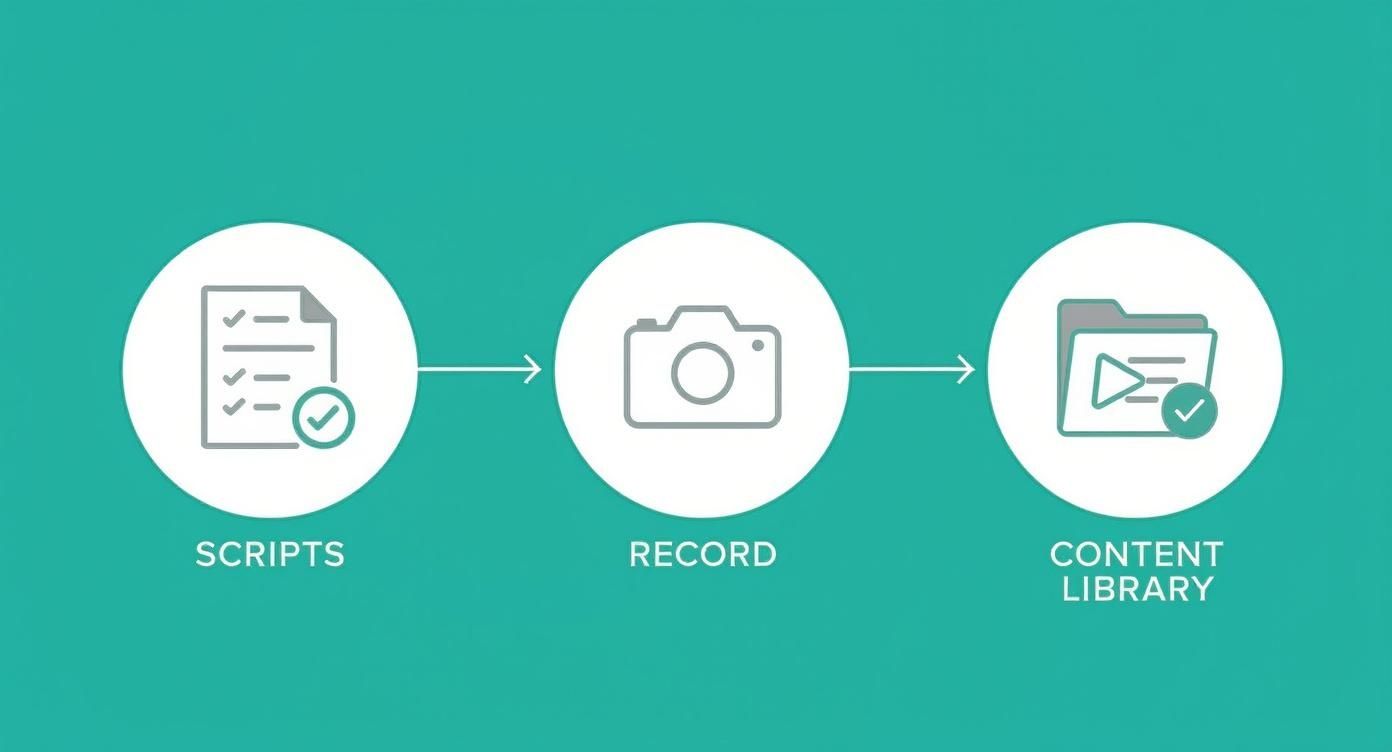
As you can see, once you've batched your recordings into a content library, you have a pile of raw material ready for this AI-assisted workflow.
Adding the Human Touch
With the boring cleanup out of the way, you can jump straight into the fun part: adding your unique style and production value. Think of the AI's output as a clean canvas. Now it's time for you to paint.
This is where you should be spending your energy, focusing on things that genuinely make the video better for the viewer:
- Adding B-roll: Drop in relevant clips or stock footage to visually explain what you're talking about. It keeps people's eyes engaged.
- Popping in graphics: Use simple text on screen, lower thirds, or quick animations to emphasize your main points.
- Finding the right music: A subtle background track does wonders for the energy and mood of a video. Don't skip this.
This hybrid approach is quickly becoming the norm. Data shows that by 2025, over 80% of creators will be using AI in their workflows. It makes sense—86% of marketers already say it saves them at least one hour on creative work. If you want to dive deeper, you can find more insights on AI in video creation and see why 68% of companies are reporting a higher ROI from it.
Publishing Your Video and Making it Go Further
Hitting "export" on your video edit is a great feeling, but the work isn't quite done. Honestly, what you do after the edit is often what separates the videos that get seen from the ones that fade into obscurity.
Without a solid plan for publishing and promotion, you're leaving everything up to chance. I’ve found that having a simple pre-publish checklist is the key to making sure every video has its best shot right out of the gate. It keeps you consistent and ensures you don't miss any of the small things that make a big difference.
Your Pre-Publish SEO Checklist
Before any video goes live, I run through a quick SEO check. This is basically how you tell the YouTube algorithm exactly what your video is about and who it's for. It doesn't have to be a huge, complicated process, but skipping it is a mistake I see too many creators make.
Here’s what I always double-check:
- Keyword-Driven Title: Is the title something people would actually search for? Make sure your main keyword is front and center. It needs to be interesting but also functional.
- Optimized Description: The first couple of lines are your sales pitch. I always write a quick, engaging summary that includes the main keyword and clearly tells viewers what they're going to get out of watching.
- Relevant Tags: I use a mix of broad and super-specific tags. Think about your main keyword, other ways people might phrase it, and even some popular, related channels in your niche.
- Compelling Thumbnail: Your thumbnail is your video's billboard on a very busy highway. I aim for bright colors, easy-to-read text, and a shot of my face that conveys the video's emotion.
This little routine ensures you’re not just throwing content into the void. You’re actively helping YouTube find the perfect audience for you.
Hitting 'publish' is just the starting line. A successful workflow includes a distribution plan that gives your content life beyond its initial launch on YouTube.
Multiply Your Impact by Repurposing Your Content
Here's the real secret to growing your audience without completely burning yourself out: content repurposing. Think about it—that one 10-minute YouTube video you just finished is an absolute goldmine of smaller, bite-sized content.
Instead of feeling the pressure to create something new for every single platform, every single day, you just break down your main video. It's all about working smarter. You did the hard part already—the research, the script, the filming. Now you just have to slice it up for different platforms to meet people where they are.
From just one of my videos, I can typically create:
- Short-Form Video Clips: I'll pull 3-5 of the best moments—a surprising fact, a key takeaway, or a funny story. A quick trim, some captions, and they’re ready for TikTok, Instagram Reels, and YouTube Shorts.
- Quote Graphics: I’ll find a powerful line from the script and drop it onto a simple branded template. These are perfect for sparking conversations on Instagram or Facebook.
- Blog Post or Newsletter: The video script is already a perfect outline. I’ll flesh it out a bit to create a full blog post, which helps me get discovered on Google, too.
- Audiograms: Sometimes I'll take a compelling audio snippet, add an animated waveform, and share it as an Instagram Story or on LinkedIn.
This approach turns one big effort into a dozen little pieces of content. It builds your brand everywhere and, ultimately, drives more people back to your main channel. It's an absolutely essential part of a modern, sustainable content creation workflow.
Your YouTube Workflow Questions, Answered
Even the best-laid plans hit a few bumps in the road. When you're trying to build a solid content creation workflow, some common questions always seem to pop up. Let's dig into the stuff that trips creators up so you can sidestep these issues before they derail your progress.
One of the biggest struggles I hear about is just staying consistent when life inevitably gets in the way. The answer isn't to hustle harder; it's to build a buffer. Seriously, this is a game-changer. Using the batching techniques we talked about, aim to get a backlog of 2-4 videos completely finished and ready to publish. This little content library is your safety net, keeping your channel active even when you have a crazy week.
When Is It Time to Outsource?
At some point, you'll realize you're the main bottleneck holding your channel back. It's a good problem to have! So, what’s the first thing you should hand off to someone else?
For most of us doing talking-head videos, the easy answer is the initial, nitty-gritty edit. I'm talking about cutting out all the "ums," awkward pauses, and retakes. A virtual assistant (VA) or a freelance editor can easily take this off your plate, saving you a massive 5-10 hours per week. They give you back a "clean cut," which frees you up for the creative stuff—like adding B-roll, finalizing the story, and scripting your next videos.
Remember, the goal is to build a business, not just a video-making hobby. Outsourcing the most draining, least creative tasks is how you start working on your channel, not just in it.
How Often Should I Tweak My System?
Your workflow shouldn't be a rigid set of rules. Think of it as a living, breathing process that needs to adapt as your channel grows and new tools come on the scene. I find it really helpful to do a quick "workflow audit" every quarter.
Just ask yourself a few simple questions:
- What’s the single most annoying part of my process right now?
- Is there a new tool out there that could automate this headache?
- Does my current schedule still make sense for my life and my channel goals?
This kind of regular check-in keeps your system running smoothly and helps you avoid burnout. And what about those days when you're just not feeling it? Don't try to force creativity. That's what your content calendar and video buffer are for. Trust the system, because consistency will get you through the lulls, and inspiration always comes back around once you find your rhythm again.
Stop wasting hours on tedious editing. Tubentum auto-magically removes silences, filler words, and long pauses from your talking-head videos, delivering a clean, tight edit in minutes. Reclaim your time and focus on what you do best by visiting the official Tubentum website.