
The weekly AI ad batch
Every week I make a new batch of AI video ads for each brand I work with, and last week’s ad data decides what goes in it. Nothing costs money until the brand says yes, and one clip is made and checked before the rest.
For one brand, ads from these batches brought in $360K in tracked sales on Meta.
This is the simple version of the Claude skill I run it with. It keeps the ten steps and the five stops, and it works with your own tools. Seven Python scripts do the checks that are easy to get wrong by hand, and templates cover the brand file, the concept cards and the shot list.
Claude skill
Get the Claude skill
Connect your Meta ad account or attach an Ads Manager export, and Claude runs the batch with you step by step. It stops five times for your yes, and nothing costs money before the second stop.
What’s in the zip
The skill
SKILL.mdThe ten steps, the five stops and the rules Claude follows
Scripts · Python 3 and ffmpeg, nothing else
scripts/read_account.pySorts your ads into winning, getting tired and not tested yetscripts/rank_posts.pyRanks organic posts by likes ÷ views and flags bought viewsscripts/price_ceiling.pyPrices every still and clip, adds 15% for fixes, prints the ceilingscripts/word_check.pyCompares each clip to the script word for word, plus words per secondscripts/frames.pyStart, middle and end frame of every clip in one imagescripts/length_check.pyCatches a finished video that came out shorter than its clipsscripts/loudness.pyMeasures every video’s loudness and evens it out
Templates
templates/brand.mdProduct, offer, buyer, and the claims you can and can’t maketemplates/concept-card.mdOne concept card with the 6 desire linestemplates/shots.csvThe shot list the scripts readtemplates/prices.csvYour price per image, clip or second
Examples
examples/Sample ad exports and posts to try the scripts on
To install: in Claude.ai, go to Settings > Capabilities > Skills and upload the zip. In Claude Code, unzip it into ~/.claude/skills/
First scenes of AI ads I made for other brands.
The batch on one page
Ten steps, five stops for your yes
- 00$0Set upBrand file, real product photos, ad data, target CPA
- 01$0Read the accountThree lists: winning, getting tired, not tested yet
- 02$0ResearchCompetitor ads, top posts and buyer quotes, checked at the source
- 03$0ConceptsConcept cards that pass all 6 desire linesSTOP 1 · your yes
- 04$0Scripts + shot listScored hooks, reviewed scripts and a price ceilingSTOP 2 · your yes
- 05Look packOne still per character, place and propSTOP 3 · your yes
- 06ClipsOne clip per concept first, then the restSTOP 4 · your yes
- 07EditCaptions from the script, every video at the same loudnessSTOP 5 · your yes
- 08LaunchUploaded paused. You turn them on.
- 09TrackWhat Meta spends on becomes step 01 of the next batch
Step 00 · Once per brand
Set up
Claude asks for anything missing, in one message:
What Claude asks for1. Brand file: product, price, offer, who buys it, claims you can make, claims and words you can't. 2. Real product photos: front, side, in a hand. 3. Ad data: access to the Meta ad account (read-only is enough), or two Ads Manager exports at ad level, 7-day click: one for lifetime, one for the last 14 days. 4. Target CPA. 5. Tools: a video model, an image model, a voice tool, a transcription tool, ffmpeg and Python 3. 6. Batch size: concepts × hooks. Default 5 concepts × 2 hooks = 10 videos.
templates/brand.mdProduct, offer, buyer, and the claims you can and can’t make
Every step’s output is saved in one folder per batch, so a batch can be picked up again where it stopped.
Step 01 · Meta ad data
Read the account
Every ad goes into one of three lists. read_account.py does the sorting from the two exports:
The three listsWinning: last 14 days at or under target CPA. Getting tired: lifetime CPA looks fine, but the last 14 days are over target. These are the ads to make new versions of. Not tested yet: spent less than 2× target CPA. These have not failed. They can run again.
scripts/read_account.pySorts your ads into winning, getting tired and not tested yet
What read_account.py prints on the example files $ python3 scripts/read_account.py --lifetime examples/lifetime.csv --last14 examples/last14.csv --target-cpa 40 Target CPA 40.00 · results column "Purchases" · 9 ads WINNING (2): last 14 days at or under target CPA Ad Life spend Life CPA 14d spend 14d CPA UGC | cold coffee commute | hook A 4,210.55 32.14 1,320.40 32.20 Podcast clip | night shift 520.00 32.50 260.00 32.50 GETTING TIRED (2): lifetime looks fine, last 14 days over target. Make new versions of these Ad Life spend Life CPA 14d spend 14d CPA Founder story | kitchen 6,150.00 36.18 1,100.00 57.89 UGC | cold coffee commute | hook B 2,980.10 33.86 910.00 53.53 NOT TESTED YET (2): spent under 2x target CPA. Not failed. They can run again Ad Life spend Life CPA 14d spend 14d CPA Skit | roommate steals mug 61.20 61.20 61.20 61.20 Street interview | hook A 35.00 - 35.00 -
Lifetime numbers hide an ad that is dying. The last 14 days don’t.
If the brand’s older ads are all getting worse at the same time, that points to the offer, not the ads. Add new ideas instead of copying formats.
Step 02 · Three lanes at once
Research
Three lanes, run at the same time with sub-agents if you can:
Research lanesPaid: competitor ads in the Meta Ad Library. Keep only ads still running 2+ weeks later. Note the hook, the format and the offer. Organic: top TikTok, Instagram and YouTube posts in the niche. Judge them by likes ÷ views, never by views. Read the comments: that's where buyers use their own words. Community: Reddit threads and reviews, the brand's and competitors'. Copy quotes exactly, with upvotes or stars. Check 3 quotes per lane against the source before using any of them.
scripts/rank_posts.pyRanks organic posts by likes ÷ views and flags bought views
If a competitor already runs your idea, that’s proof people want it. Keep the idea and change the words.
Step 03 · STOP 1
Concepts
Before writing anything new, check whether old footage can already say it. Then each concept goes on a card:
Concept cardConcept {n}: {name} Buyer: {who, and the situation they're in} Source: {ad, quote or review} Built on: {winning ad / tired ad / competitor survivor / research quote} Funnel: {top / middle / bottom} Story: {problem} → {what they tried} → {why it failed} → {what changed} Hook A: {first line} Hook B: {first line} This tests: {the one thing it will tell you}templates/concept-card.mdOne concept card with the 6 desire lines
A card only reaches you if it passes all 6 desire lines: the pain shown as a scene, not the buyer’s fault, a picture with a time or a place, ownership or regret, one strong proof, and a nudge to act now.
Two concepts only count as different if at least two of these change: buyer, format, message, first frame.
STOP 1: you see the cards and what each one tests. Nothing has been spent yet.
Step 04 · STOP 2
Scripts and shot list
Every hook is written in 3 lines, and every shot gets one entry:
Hook + shotWho it calls: {the person who should stop scrolling} What you see (first 3 s): {the picture} What is said: {the line} Shot {concept}-{n} · {seconds} s On screen: {what the viewer sees} Says: "{exact words}" ({how: tired, amused, rushed...}) Product: {none / small, under 1/3 of the frame} References: {which real photos} Model: {model}, {length}templates/shots.csvThe shot list the scripts readtemplates/prices.csvYour price per image, clip or secondscripts/price_ceiling.pyPrices every still and clip, adds 15% for fixes, prints the ceiling
A hook gets rewritten if it still makes sense with a competitor’s product name in it, opens with a fact about the category, leads with the product name, or doesn’t make sense with the sound off.
Three reviewers score every line: a media buyer, a director with a native English ear, and a claims and policy reviewer. Every line ends at 4 out of 5 or higher.
STOP 2: you see the final scripts and the price ceiling together. That’s every still and clip times its price, plus 15% for fixes.
Step 05 · Image model · STOP 3
Look pack
Stills only, no video yet. One still per character, place and prop:
Look rulesReferences are real photos, never stock or studio shots. Faces: write the person from text only, then place them into a real photo of the location, a few metres back from the lens. Overcast light, off-centre, real clutter. Magazine-perfect reads as AI.
STOP 3: no video credits go to a look you haven’t approved.
Step 06 · Video model · STOP 4
Make the clips
One talking clip per concept comes first, plus one fully edited reference ad of about 30 seconds. Every clip goes through these checks:
Clip checksBefore sending a shot: - Product reference photos only on shots where the product shows. - The length is inside the model's limit. Check the model's own docs, never memory. - The exact words are written out, with how they're said. - The product is under 1/3 of the frame. Bigger than that, AI rewrites the label. After every clip: - Listen: transcribe it and compare it to the script word for word. One wrong word = not usable. - Read: zoom in on the product label. AI misspells labels. - Look: put the start, middle and end frames of every clip in a concept side by side.
scripts/word_check.pyCompares each clip to the script word for word, plus words per secondscripts/frames.pyStart, middle and end frame of every clip in one image
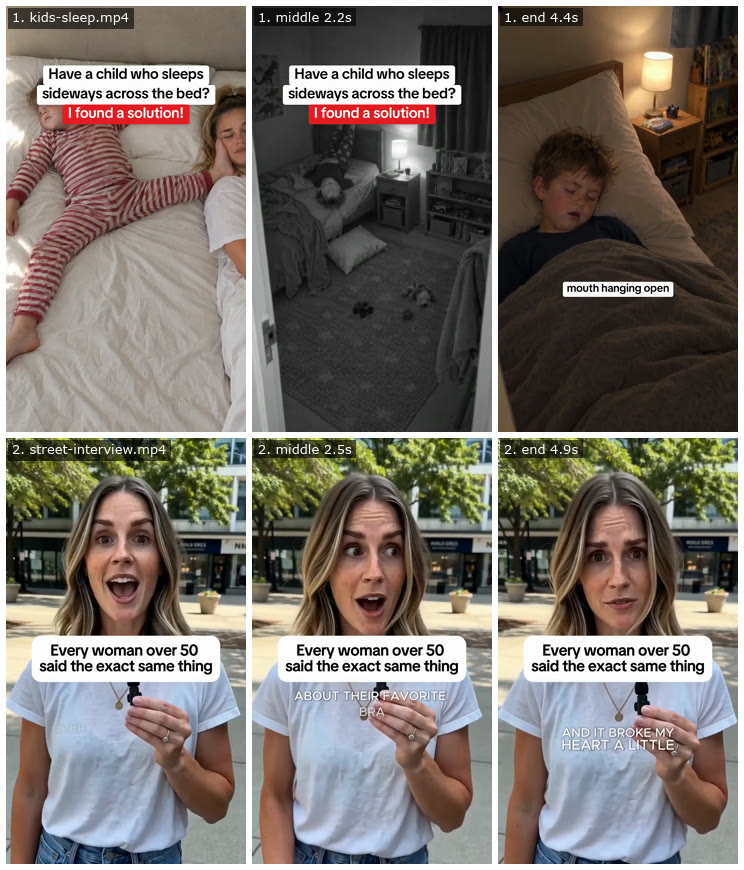
What frames.py makes from two of the clips above: start, middle and end frame, one row per clip. STOP 4: voice, pace and casting are decided here, for the price of 5 clips instead of 60. Then the rest get made.
When something fails, it goes back only as far as the cause: a weak hook to the concept, broken logic to the script, a wrong scene to the shot list, one bad clip to that clip only.
Step 07 · ffmpeg · STOP 5
Edit
Clips are joined in shot-list order, then checked:
Edit checksThe finished length equals the clips added together. If not, something got cut. Captions come from the script text, not auto-captions. 3 words at a time, clear of the Reels buttons. Every noun that's spoken is on screen. Nothing held still longer than about 3 seconds. The same clip never appears in two concepts. One narrator = one voice setting from the first line to the last. Every video at the same loudness.
scripts/length_check.pyCatches a finished video that came out shorter than its clipsscripts/loudness.pyMeasures every video’s loudness and evens it out
STOP 5: you watch every video with the sound on, and anything you flag gets fixed.
Step 08 · Ads Manager
Hand over and launch
Before anything goes live:
LaunchRun the word check once more on the finished videos, and check them against the banned list. Write down what the batch cost. Upload the ads paused. You check them in Ads Manager and turn them on.
scripts/word_check.pyCompares each clip to the script word for word, plus words per second
Claude never turns ads on or changes a budget.
Step 09 · Every day
Track
After launch:
TrackingWithin 48 hours: write down which live ad is which script. Ad names get changed, so match by the ad copy. Every day: which new ads Meta is spending on, which are winning, which are getting tired. Save clips without faces into a library with one line on what each shows. Reusing a clip costs almost nothing.
That daily list is step 01 of the next batch.
Lessons
Every mistake becomes a rule
The skill ends with an empty Lessons list. Every time something goes wrong, you add one line there and one check to the step that should have caught it. That list is what makes each batch better than the last one.
Done for you
Want this set up for your brand?
Book a call and I’ll set it up for your product.
Book a call