
In the world of business and content creation, editing is where your message gets refined. But I'm not talking about flashy, cinematic editing. I'm talking about practical video editing—the kind that transforms raw footage into a powerful business asset. It's a strategic approach built for viewer retention and business growth, shifting the focus from complex artistic techniques to clear, engaging communication that keeps your audience glued to the screen and drives results.
Why Practical Video Editing Is Your Growth Engine
If you're a busy creator or business owner, your time is your most valuable asset. The old way of editing—spending hours manually trimming clips, painstakingly removing every "um" and "ah," and endlessly scrolling for the perfect B-roll—is a recipe for burnout and slow growth. This is where a smarter, business-focused workflow isn't just a nice-to-have; it's a critical competitive advantage.
This modern process is all about efficiency and impact. It zeroes in on the elements that actually contribute to your business goals, like lead generation or brand authority, and cuts out the rest.
The Shift from Cinematic to Business-Focused Editing
Think about traditional filmmaking. It often relies on artistic expression, long takes, and subtle transitions. That's fantastic for the big screen, but it’s often too slow and out of sync with the needs of a business trying to capture attention online.
Business-focused video editing is ruthlessly efficient by comparison. The goals are simple and direct:
- Grab attention instantly, ideally within the first 3-5 seconds.
- Deliver value clearly and concisely, with zero fluff.
- Keep the pace moving to hold viewers until the very end.
- Drive a specific action, like getting a subscriber, a click, or a sale.
This mindset acknowledges a hard truth: every single second of your video has to earn the viewer's attention and contribute to your bottom line.
The goal isn’t just to make a video. It’s to build a communication tool that gets a specific result. Your editing is what makes sure that message is seen, understood, and acted upon.
Automation: The Shortcut to Professional Results
Even with a business-first mindset, the manual work can be draining. Removing every filler word, cutting dead air, and adding perfectly timed visual hooks takes a ton of effort. This is where a service like Tubentum acts as a shortcut to the ideal state of effortless, professional video.
Instead of you having to manually scrub through hours of footage, Tubentum automates the most time-consuming tasks. Its AI can instantly remove silences with Magic Cut, chop out filler words, and even use AI to suggest the best hooks for your intro.
This frees you from the drudgery of the rough cut. Now, you can invest your limited time in what really matters: refining your story, adding visuals that reinforce your brand, and building a real connection with your audience. It's the fast track to high-impact business video without the burnout.
Planning Your Shoot to Simplify Editing
Great video editing doesn't start with the software—it begins long before you hit the record button. For creators and businesses, every minute you invest in pre-production will save you hours of headaches later. The real secret to a faster, more effective workflow is to think like an editor while you’re still filming.
The whole idea is to structure your content for viewer retention from the get-go. Instead of rambling and hoping for the best, you need a clear roadmap that guides your audience from the first second to the last. This isn’t about being rigidly scripted; it’s about having a defined, intentional structure that serves your business goals.
Architect Your Video for Engagement
Before your camera is even set up, take a few minutes to outline these three critical elements for every video. This simple framework ensures your message has clarity and purpose.
- The Hook: What will you say or show in the first 3-5 seconds to stop someone from scrolling? It could be a bold question, a surprising stat, or a quick flash of the amazing final result you’re about to break down.
- The Core Message: What are the 2-4 main talking points you need to cover? This keeps you from wandering off on tangents and makes editing feel more like assembling pre-planned blocks of content.
- The Call-to-Action (CTA): What’s the single most important action you want the viewer to take? Whether it's to subscribe, visit your site, or grab a free download, state it clearly at the end.
Thinking through these points ensures every bit of footage you record serves a purpose, cutting down on wasted time for both you and your audience.
Film with Your Future Self in Mind
With your structure in place, you can use a few simple techniques on set to make the editing process a breeze. These aren't complicated Hollywood tricks; they're practical shortcuts built for speed.
One of the oldest tricks in the book is still one of the best for syncing audio. If you're recording audio on a separate device, a single, sharp clap at the start of a take creates a massive spike in the audio waveform. This gives you a perfect visual cue to line up your video and audio tracks in seconds, a task that can otherwise be a real pain.
Also, get in the habit of monitoring your audio levels while you record. Trying to fix distorted or barely-audible audio in post-production is a nightmare. A quick glance to ensure your levels are consistently hitting that sweet spot between -6dB and -12dB can save entire takes from the trash bin. When you nail the audio at the source, your editing software has much less heavy lifting to do.
A clean recording is the ultimate editing shortcut. Five minutes of careful setup can prevent five hours of audio repair later, ensuring your message is heard loud and clear.
Smart Framing and Presentation
How you frame yourself on camera has a direct impact on your editing flexibility. If you know you'll be posting to multiple platforms, think about shooting with "safe zones" in mind. Keep the important stuff—like your face and any key visuals—centered in the frame, leaving plenty of empty space around the edges. This makes it incredibly easy to crop your video to a vertical 9:16 for TikTok or a square 1:1 for an Instagram post without losing anything critical.
Your on-camera delivery also makes a big difference. Speaking with clear, deliberate pauses between your main points creates natural "cut points" for the edit. It’s so much easier to snip out a mistake or rearrange sections without a jarring jump cut when you’ve given yourself those little moments of silence. For more on this, our complete guide on how to look good on video has plenty of tips to boost your confidence.
By making these planning habits part of your routine, you stop just filming and start creating a clean, organized project that’s ready for a quick and painless edit. This is how you shift from spending all night in your editor to consistently shipping high-quality content.
Building an Efficient Editing Assembly Line
Your raw footage is a pile of potential, but the editing suite is where it gets shaped into a real business asset. The goal isn't just to edit a video; it's to build a repeatable system that cranks out professional, high-impact content every single time. This is how you move away from chaotic editing sessions and into a structured process built for speed and quality.
Think of it this way: having a solid workflow in place before you even touch a new tool is the key to making that tool work for you, not the other way around.
This diagram breaks down the basic stages of a smart video creation process, from the initial idea all the way to the final export.
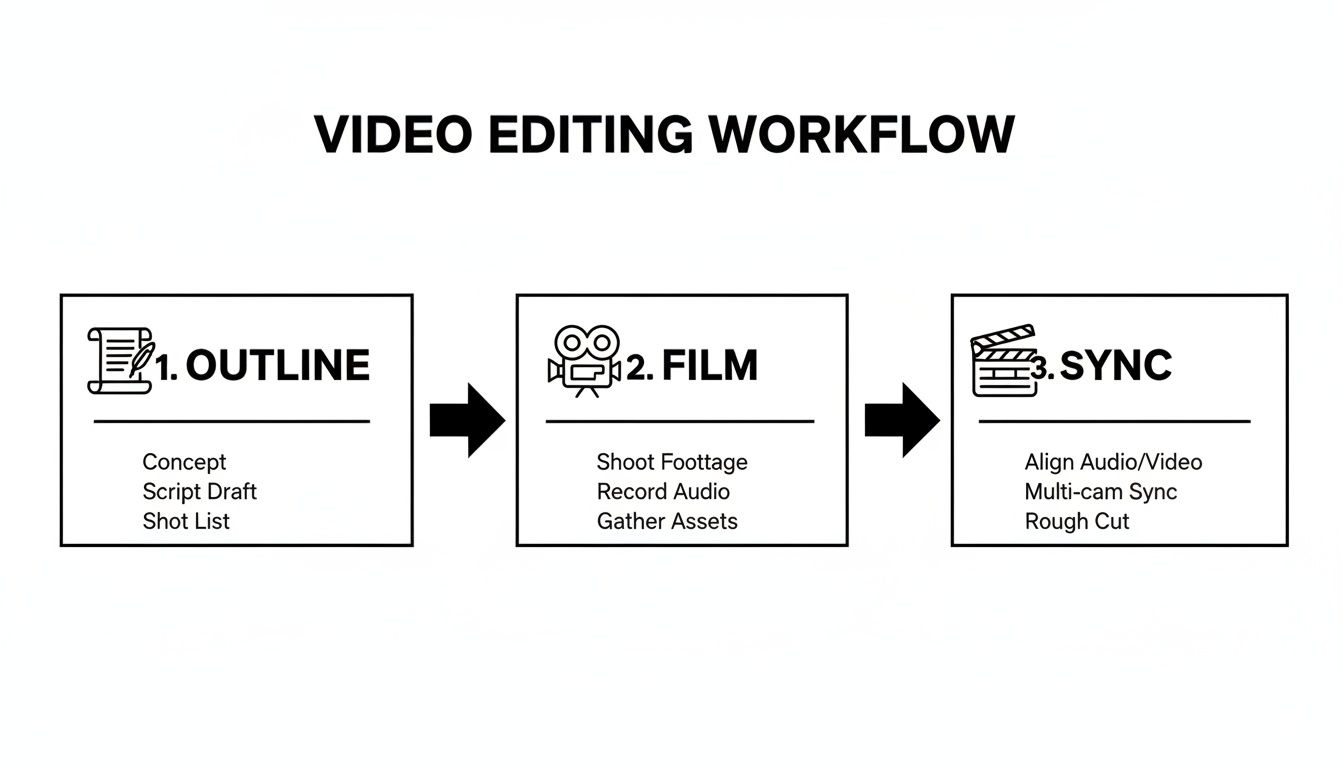
Seeing the entire process laid out visually just clicks. You can see how each step logically flows into the next, which is exactly how you prevent endless revisions and headaches down the line.
The Surgical Rough Cut
Your first pass through the footage needs to be fast and ruthless. Your only job here is to get rid of everything that doesn't serve the core message. This is where you surgically remove all the obvious flubs, awkward pauses, and those pesky filler words like "ums," "ahs," and "you knows."
For most businesses and creators, this is easily the most draining part of the edit. It means manually scrubbing through timelines and making hundreds, if not thousands, of tiny cuts. For a simple 10-minute video, this phase alone can burn hours of your day.
This is exactly where a service like Tubentum becomes a shortcut to an efficient process. Its text-based editor transcribes your video, allowing you to edit the footage by simply deleting text. Its Magic Cut feature automatically finds and removes all silences and filler words, turning a multi-hour chore into a quick five-minute review.
Assembling the Story and Pacing
Once all the fluff is gone, you're left with the good stuff—the core building blocks of your video. Now, your focus shifts from cutting things out to building a compelling narrative that holds your audience's attention.
The secret to great pacing in business video is simple: variation. You can't just let a talking-head shot drone on and expect people to stick around. You have to keep things moving.
- Jump Cuts and Zooms: Use quick cuts or subtle digital zooms to add emphasis or reset the viewer's focus. Tubentum's Magic Zoom can automate this process, adding dynamic movement to keep your talking-head shots engaging.
- Strategic B-roll: Don't just tell, show. If you're talking about a product, cut to a shot of it. If you're explaining a process, show it in action.
- Text Overlays: Pop key phrases or data on the screen to reinforce your points. This is a must for viewers watching with the sound off, and it makes your message stick.
An editing assembly line isn’t about being robotic; it's about being systematic. When you break the process into clear stages—first remove the bad, then arrange the good—you work faster and with more creative focus.
To give you a clearer picture of the efficiency gains, let's compare the old way of doing things with an AI-assisted workflow.
Traditional Editing vs Tubentum's AI Workflow
| Editing Task | Traditional Method (Est. Time for 10-min video) | Tubentum's Automated Method | Time Saved |
|---|---|---|---|
| Removing Silences | 30-60 minutes | Auto-detected & removed in under 1 minute | ~98% |
| Cutting Filler Words | 45-75 minutes | Auto-detected & removed in under 2 minutes | ~97% |
| Creating Captions | 30-45 minutes | Auto-transcribed & generated in 2-3 minutes | ~90% |
| Finding Highlights | 20-30 minutes | Key moments suggested by AI | ~90% |
As you can see, the time savings are staggering. It's not about replacing the editor; it's about giving them superpowers to focus on what matters most: the story and the business impact.
Why a Systemized Workflow Matters
The demand for video isn't going anywhere. The global video editing software market hit $3.09 billion in 2023 and is on track to hit $5.13 billion by 2032, fueled by creators and businesses on YouTube, TikTok, and beyond. That spells massive opportunity, but it also means the competition is fierce.
Without an efficient system, burnout is almost a guarantee. An assembly-line approach, on the other hand, gives you a clear roadmap for every project. It starts with your toolset, so it's worth exploring the best video editing software for beginners to find a platform that fits your style.
When you have a defined process, you kill decision fatigue. You know exactly what comes next, freeing up your mental energy to focus on the creative side of things instead of getting stuck on technical details. This is how you scale production without letting quality slip.
Ultimately, Tubentum is designed to be the ultimate shortcut in this process. By automating the most tedious parts of the assembly line, it lets you jump straight to the fun, creative work. You get the polish of a high-end video in a fraction of the time, making consistent content creation a manageable reality instead of an overwhelming chore.
Adding Professional Polish with Audio and Visuals
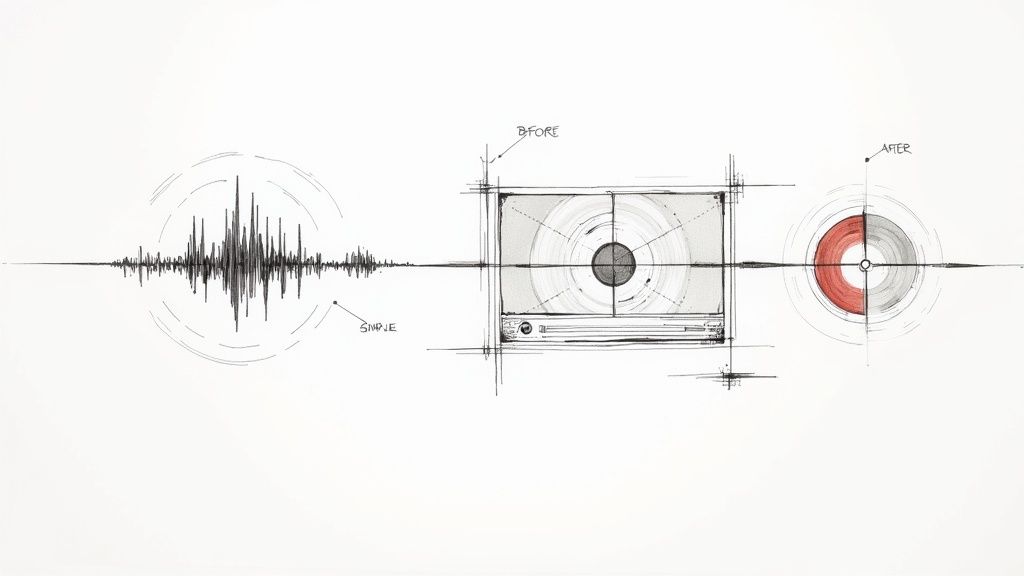
A video with a great structure and clean cuts is a solid start, but the final polish is what really makes your content stick. This isn't about adding complex cinematic effects; it's about making sure your audio is clean and your visuals are on-brand. This is the stage where a good video becomes a great one—the kind that builds trust and authority with your audience.
Think about it: poor audio is one of the fastest ways to lose a viewer. If they can't hear you clearly, they're gone. In the same way, inconsistent visuals can make your whole brand look amateurish. The goal here is to layer in quality that elevates the viewing experience without bogging you down for hours.
Mastering Your Audio for Clarity and Impact
Crystal-clear audio is completely non-negotiable for any serious business or creator. Your message is the core of your video, and if it’s muffled by background noise or drowned out by music, its value is lost. The good news is you don’t need a professional recording studio to get fantastic results.
Your first job is to get a clean vocal track. Little distractions like a humming air conditioner, the whir of a computer fan, or distant traffic can easily pull a viewer out of the moment.
- Noise Reduction: Nearly every modern editing tool has some form of noise reduction. For creators, a one-click solution is a lifesaver. Tubentum's AI audio enhancement feature automatically removes background noise and balances levels, giving you studio-quality sound without you having to mess with a dozen confusing sliders.
- Balancing Levels: Your voice should always be the star of the show. When you add background music, a good rule of thumb is to set its volume somewhere between -18dB and -24dB. This ensures it sits comfortably underneath your voice, which should be peaking around -6dB.
- Strategic Sound Effects: Simple sounds—a subtle "whoosh" for a text overlay or a "ding" for a key point—can add a surprising amount of engagement. Just use them sparingly to emphasize actions, not to distract from your message.
If you want a deeper dive into isolating your voice, our guide on how to remove background sound from video offers some practical, step-by-step advice.
Enhancing Visuals with Color and Graphics
Just like with audio, your video's visual quality sends a strong signal about your professionalism. This doesn't mean you need to become a Hollywood-level colorist overnight. Simple, consistent visual tweaks can establish a recognizable brand style and just make your content more enjoyable to watch.
Color correction is your first and most important step. The goal here is simply to make the video look natural and balanced—as if you were seeing it with your own eyes. Focus on adjusting the white balance to remove any weird color casts (like that yellow tint from indoor lighting) and tweaking the exposure so the image isn't too dark or blown out.
Once your colors are corrected, you can move on to color grading. This is where you get creative and apply a specific "vibe" to your footage that matches your brand. Maybe you lean toward warm, inviting tones, or perhaps you prefer a clean, modern, and slightly desaturated look. The absolute key here is consistency across all your videos.
Think of your visual style as your brand's uniform. When viewers see it, they should instantly recognize it as yours. This visual consistency builds brand recall and makes your content feel more cohesive and professional.
Boosting Retention with Captions and Accessibility
In the world of business video, captions are no longer an optional extra—they're essential. A huge number of people watch videos on mute, so captions make sure your message gets through no matter the situation. They also open up your content to a wider audience, including those who are deaf or hard of hearing.
But manually transcribing and timing captions is an incredibly tedious job. Tubentum's auto-captioning feature can generate accurate, timed captions in minutes, freeing you from a task that is critical but frankly, a grind. You can then easily tweak the font and style to match your brand's look, ensuring every video is perfectly on-brand and accessible.
The market for creator-focused tools is exploding for exactly these reasons. While professional users still account for 60% of video editing software revenue, personal creators and small businesses are the fastest-growing segment, expanding at a 7% CAGR. This growth is driven by the demand for powerful, accessible tools that simplify workflows. In fact, mobile and tablet editors are growing at a 9% CAGR as creators demand more flexibility on the go. You can read more about these market shifts in the full report on video editing software market trends from SNS Insider. Polishing your audio and visuals is the final hurdle in turning raw footage into a piece of content that looks, sounds, and feels truly professional.
Exporting and Publishing for Maximum Discovery
You've done the hard work—the planning, shooting, and meticulous editing. But a brilliant video that nobody sees doesn't grow your business. The final sprint of exporting and publishing is what separates a video that gets lost in the noise from one that finds its audience and drives results.
Getting these last few steps right is critical. Incorrect export settings can sabotage your quality, and a weak publishing strategy is like hiding your best work under a rock. Let's make sure that doesn't happen.
Nailing Your Export Settings
First things first, you need to get the video out of your editor and into a high-quality file. While every platform has its own nuances, a few universal settings will give you a pristine final product for most business content, especially on YouTube.
- Resolution: Don't downscale your work. If you shot in 4K (3840x2160), export in 4K. If you shot in 1080p (1920x1080), export in 1080p. Platforms reward higher-resolution content, and it just looks better.
- Frame Rate: Keep this consistent with your source footage. Most business content is shot in 24 or 30 frames per second (fps), so your export should match. This avoids any weird, choppy playback issues.
- Bitrate: This is the balancing act between quality and file size. A good rule of thumb for 1080p is a bitrate of 8-12 Mbps. For crisp 4K, you'll want to bump that up to 35-45 Mbps.
These settings will give you a sharp video that looks professional without being so massive that it takes all day to upload.
Crafting a Magnetic Publishing Strategy
With the final video file on your computer, your job shifts from editor to marketer. Your title, thumbnail, and description are your video's first impression—they have to do the heavy lifting to earn the click and serve your business goals.
Start with your title. It needs to be searchable and compelling. Instead of something flat like "New Product Review," try something that teases a benefit or a solution: "This New Gadget Solved My Biggest Business Problem." It sparks curiosity while still hitting the keywords potential customers are actually searching for.
Your thumbnail is even more important. It has to pop on a crowded screen. Think bright, high-contrast images, and whenever possible, include a human face making eye contact. Add just a few words of bold, easy-to-read text that complements the title and creates a little mystery.
Your title and thumbnail make a promise to the viewer. Your video's job is to deliver on that promise. A mismatch between the two is the fastest way to lose trust and kill your watch time.
Optimizing for Search and Accessibility
Finally, let's talk about the description. This is your secret weapon for SEO. The first couple of lines are crucial because they show up in search results, so make sure they summarize the video's value and include your main keyword.
But don't stop there. Below the fold, write a more detailed summary, add links to resources you mentioned, and use timestamps to help viewers jump to specific sections. This isn't just helpful; it keeps people watching longer.
For a serious SEO and accessibility boost, you should also transcribe video into text and paste the full transcript into your description. This simple step makes every single word you say searchable, dramatically expanding your video's reach beyond just a few keywords in the title.
The growing creator economy is fueling the development of incredible tools to help with all of this. The video editing software market alone is projected to grow from 43 million paid users in 2023 to nearly 64 million by 2030. While industry giants still dominate, this growth means more innovative and accessible tools are hitting the market all the time. For businesses and creators, this means you can focus on the high-impact strategy that actually gets you noticed.
Your Top Video Editing Questions, Answered
As you get deeper into creating business content, you start running into the same questions over and over. It doesn't matter if you're a seasoned pro or just starting out—everyone wants to build a workflow that's both effective and sustainable. Let's break down some of the most common questions from creators and businesses.
The aim here isn't just about editing faster. It's about editing smarter, so every second you invest in post-production genuinely adds to your video's business impact and helps you grow.
How Long Should It Take to Edit a 10-Minute YouTube Video?
Ah, the classic question. While there's no single answer, we can definitely establish a realistic range for business content.
For a beginner who's manually slogging through a 10-minute talking-head video, it's pretty normal to spend 4-8 hours on a single edit. On the flip side, an experienced creator with a streamlined, repeatable process can knock that same video out in just 1-3 hours.
The biggest time-killers are almost always the same two things: getting that initial rough cut done (snipping out all the mistakes, "ums," and long pauses) and then adding captions.
The real measure of a good workflow isn't just the hours you put in. It's about the quality of what comes out and whether you can keep doing it without burning out. If your editing process is a bottleneck to your business growth, it's broken.
This is exactly why so many businesses are turning to AI-powered services. A platform like Tubentum is the shortcut to an efficient process. Its Magic Cut feature automates the entire rough cut by finding and deleting silences and filler words directly from a transcript. What used to take hours now takes minutes, freeing you up to focus on strategy and messaging.
What’s More Important for Viewer Retention: The Hook or The Pacing?
This is a great question. Think of them as two parts of a team: the hook is the gatekeeper, and the pacing is the tour guide. You need both, but they have very different jobs.
Your hook—that crucial first 5-15 seconds—is your one shot to earn the viewer's attention. It has to be compelling enough to stop their scroll and make a clear promise of the value they'll receive. If your hook fails, your pacing is irrelevant because the viewer is already gone.
But once that hook has done its job, the pacing has to take over and keep the momentum going. This is where your editing choices—like jump cuts, B-roll, sound effects, and graphics—come into play. They create a rhythm that keeps the viewer engaged. A fantastic hook followed by a slow, dragging middle section will still send your retention graph plummeting.
Do I Need Expensive Software to Create Professional Videos?
Not at all. In fact, for most businesses and content creators, big, complicated programs like Adobe Premiere Pro or Final Cut Pro can be complete overkill. They’re designed for cinematic productions and have a notoriously steep learning curve with a ton of features you’ll probably never touch.
The modern business video game is all about speed and efficiency. The "best" tool is simply the one that solves your biggest problems. Creator-focused platforms like Tubentum give you the features you actually need to create business content—like automated silence removal, AI-generated highlights, and one-click captions—without the overwhelming interface. Today, looking "professional" is more about clarity, good audio, and delivering value, not about how complex your software is.
How Can I Make My Audio Sound Better Without an Expensive Mic?
This is one of my favorite tips because great audio is more about technique than expensive gear. You can make a budget-friendly mic sound incredible if you just follow a few simple rules.
First off, get your recording space right. Find a quiet room with soft surfaces—think carpets, curtains, or even just throwing a blanket over a hard surface. This will absorb sound and cut down on echo. Then, make sure your mic is positioned correctly, usually about 6-12 inches from your mouth, to get a clean, strong signal.
From there, your editing software can do the rest of the heavy lifting.
- Background Noise Removal: This feature is a lifesaver. Tubentum's AI audio enhancement is a simple one-click solution that gets rid of distracting sounds like an air conditioner hum or computer fan.
- Audio Normalization: Use this to make sure your volume is consistent all the way through. No one wants to keep adjusting their volume while watching your video.
- Equalizer (EQ): Even a basic EQ can make your voice sound richer and clearer. It lets you boost the good frequencies and cut the bad ones.
Focusing on these simple, practical steps will give you that crisp, professional audio that makes people want to listen to what you have to say.
Ready to stop wasting hours on tedious manual edits and start producing better content, faster? Tubentum is your shortcut to a smarter workflow. It automatically removes silences, cuts filler words, and generates captions, letting you focus on what you do best—growing your business.
Discover how Tubentum can revolutionize your video editing process today.